Episode
Adding CI to Your Existing Code
Questions
- I have code already in GitHub, how can I add CI to it?
Objectives
- Learn how to get your CI/CD Runners to build your code
- Try and see if the CI/CD can catch problems with our code.
Time To Skim
The Naive Attempt
As of right now, your .github/workflows/main.yml should look like
name: example
on: push
jobs:
  greeting:
    runs-on: ubuntu-latest
    steps:
      - run: echo hello world
Let’s go ahead and teach our CI to build our code. Let’s add another job (named build_skim) that runs in parallel for now, and runs the compiler ROOT uses.
Note: ROOT is an open-source framework used in High Energy Physics.
Let’s give it a try.
COMPILER=$(root-config --cxx)
$COMPILER -g -O3 -Wall -Wextra -Wpedantic -o skim skim.cxx
The compilation will result in an output binary called skim.
Adding a new job
How do we change the CI to add a new job that compiles our code?
Solution
jobs:
  greeting:
    runs-on: ubuntu-latest
    steps:
      - run: echo hello world

  build_skim:
    runs-on: ubuntu-latest
    steps:
      - name: build
        run: |
          COMPILER=$(root-config --cxx)
          $COMPILER -g -O3 -Wall -Wextra -Wpedantic -o skim skim.cxx
Check jobs
Let’s commit and push the changes we made, and let’s go to GitHub to check if both jobs ran.
git add .github/workflows/main.yml
git commit -m "add build skim job"
git push -u origin feature/add-actions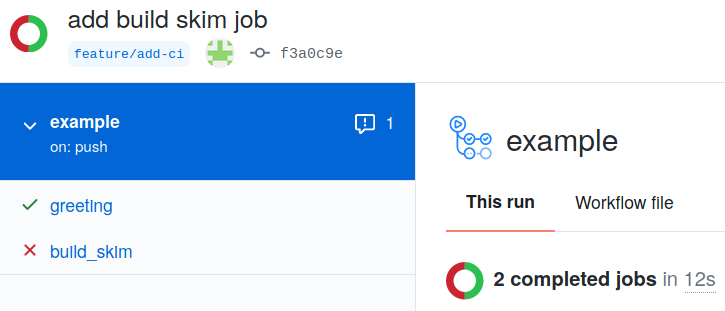
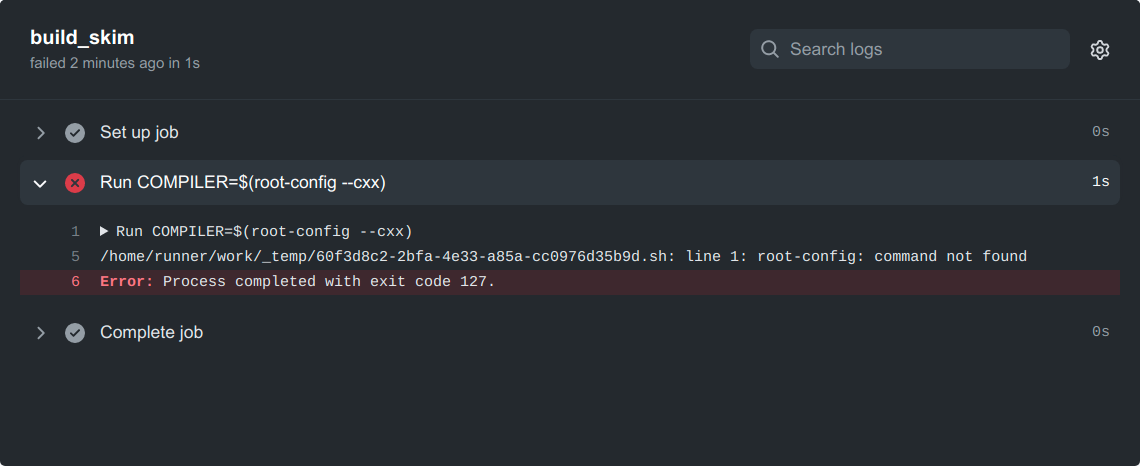
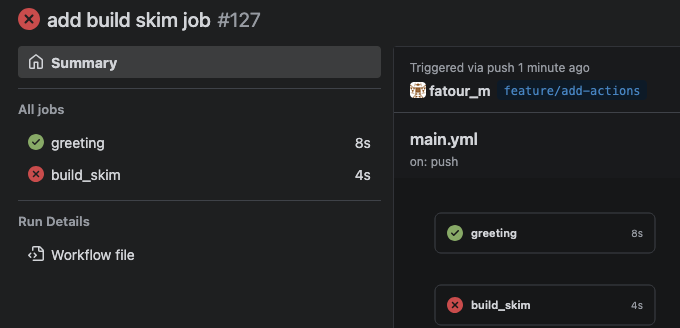
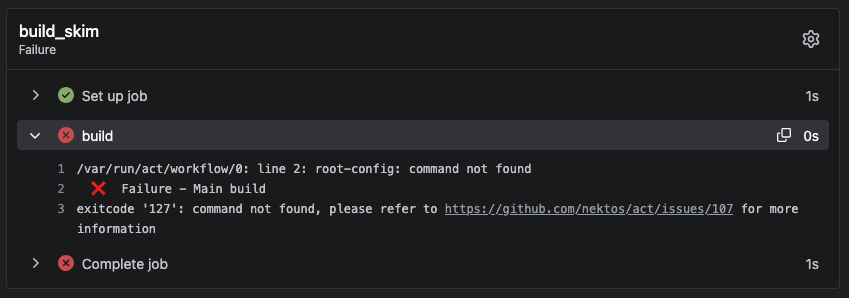
No root-config?
Ok, so maybe we were a little naive here. GitHub runners come pre-installed with a wide variety of software that is commonly needed in CI workflows (e.g. for Ubuntu 22.04 runners the list can be found here). ROOT is not pre-installed, so we will have to add a step to install it ourselves. After reading the ROOT documentation, we find that a convenient way to run it on various systems is using something called a Docker container.
There are several tools that are used for containerization, like Docker, Podman, and Apptainer (formerly Singularity). For this tutorial, you don’t need to know anything about containerization. You can just think of this as the base software set that comes pre-installed on the system that runs your code.
We will be using the Docker images hosted at the rootproject/root Docker Hub. Let’s start by using the image with tag 6.26.10-conda.
build_skim:
  runs-on: ubuntu-latest
  container: rootproject/root:6.26.10-conda
  steps:
    - name: checkout repository
      uses: actions/checkout@v4
    - name: build
      run: |
        COMPILER=$(root-config --cxx)
$COMPILER -g -O3 -Wall -Wextra -Wpedantic -o skim skim.cxxNote the extra line container: rootproject/root:6.26.10-conda that specifies the container image that we want to use. Since it comes pre-packaged with ROOT, we do not need to have a step to install it. This image also contains other tools that we will need for the rest of the tutorial.
Failed again???
What’s that?
error: skim.cxx: No such file or directory
Answer
It seems the job cannot access the repository. We need to instruct GitHub Actions to checkout the repository.
steps:
   - name: checkout repository
     uses: actions/checkout@v4
Let’s go ahead and tell our CI to checkout the repository.
Still failed??? What the hell.
What happened?
Answer
It turns out we just forgot the include flags needed for compilation. If you look at the log, you’ll see
 | skim.cxx:11:10: fatal error: ROOT/RDataFrame.hxx: No such file or directory
 |  #include "ROOT/RDataFrame.hxx"
 |           ^~~~~~~~~~~~~~~~~~~~~
  #include "ROOT/RDataFrame.hxx"
           ^~~~~~~~~~~~~~~~~~~~~
 | compilation terminated.
 Error: exit with `FAILURE`: 1
How do we fix it? We just need to add another variable to add the flags at the end via $FLAGS defined as FLAGS=$(root-config --cflags --libs).
Ok, let’s go ahead and update our .github/workflow/main.yml again, and it better be fixed or so help me…
Ways to get software
As we saw before, GitHub pre-installs many common software packages and libraries that people might need, but often we need to install additional software. There are often actions we can use for this, like actions/setup-python to install Python or mamba-org/setup-micromamba to install Mamba (an alternative to Conda, an environment manager). These actions are simply repositories that contain scripts to install or perform certain actions. You can find more information about these actions by going to github.com/<name-of-action>. For example, for mamba-org/setup-micromamba you can find more information at https://github.com/mamba-org/setup-micromamba.
If we wanted to use Conda instead of Docker, our build_skim job would look like this:
build_skim:
  runs-on: ubuntu-latest
  defaults:
    run:
      shell: bash -el {0}
  steps:
    - name: checkout repository
      uses: actions/checkout@v4
    - name: Install ROOT
      uses: mamba-org/setup-micromamba@v1
      with:
        environment-name: env
        create-args: root
    - name: build
      run: |
        COMPILER=$(root-config --cxx)
        FLAGS=$(root-config --cflags --libs)
$COMPILER -g -O3 -Wall -Wextra -Wpedantic -o skim skim.cxx $FLAGSBuilding multiple versions
Great, so we finally got it working… Let’s build both the version of the code we’re testing and also test that the latest ROOT image (rootproject/root:latest) works with our code. Call this new job build_skim_latest.
Adding the `build_skim_latest` job
What does the .github/workflow/main.yml look like now?
Solution
jobs:
  greeting:
    runs-on: ubuntu-latest
    steps:
      - run: echo hello world

  build_skim:
    runs-on: ubuntu-latest
    container: rootproject/root:6.26.10-conda
    steps:
      - name: checkout repository
        uses: actions/checkout@v4

      - name: build
        run: |
          COMPILER=$(root-config --cxx)
          FLAGS=$(root-config --cflags --libs)
          $COMPILER -g -O3 -Wall -Wextra -Wpedantic -o skim skim.cxx $FLAGS

  build_skim_latest:
    runs-on: ubuntu-latest
    container: rootproject/root:latest
    steps:
      - name: checkout repository
        uses: actions/checkout@v4

      - name: latest
        run: |
          COMPILER=$(root-config --cxx)
          FLAGS=$(root-config --cflags --libs)
$COMPILER -g -O3 -Wall -Wextra -Wpedantic -o skim skim.cxx $FLAGSDependabot for updating GitHub Action versions
GitHub Actions are accompanied by tags ("@v2"…) which are versions/tags of that action. One might need to update these tags, for example from “@v2” to “@v3” because the GitHub Actions developers may fix existing bugs to the action or there may be other updates.
However, this process can be automated by using “Dependabot”, which ensures that the workflow references the updated version of the action. If that is not the case, Dependabot will open a pull request updating the tag of the GitHub action.
The Dependabot action can be added to a GitHub repository by creating the file dependabot.yml in the .github/ folder. The content of the file looks like this (Link to the dependabot.yml):
version: 2
updates:
  # Maintain dependencies for GitHub Actions
  - package-ecosystem: "github-actions"
    directory: "/"
    schedule:
      interval: "weekly"
where interval is the frequency of looking for updates to GitHub Actions.
For more information on Dependabot, see e.g., here.
Key Points
- Setting up CI/CD shouldn’t be mind-numbing
- All defined jobs run in parallel by default